
What we have to offer
Explore the full toolkit we’ve built to modernize eventing. From the specialized mobile app for judges to the comprehensive management dashboard for organizers, here is a breakdown of the core features that make DigiProtocol work.
Please note: All screenshots, names, and results shown on this website are for demonstration purposes only and do not represent real event data.
Fence Judge app
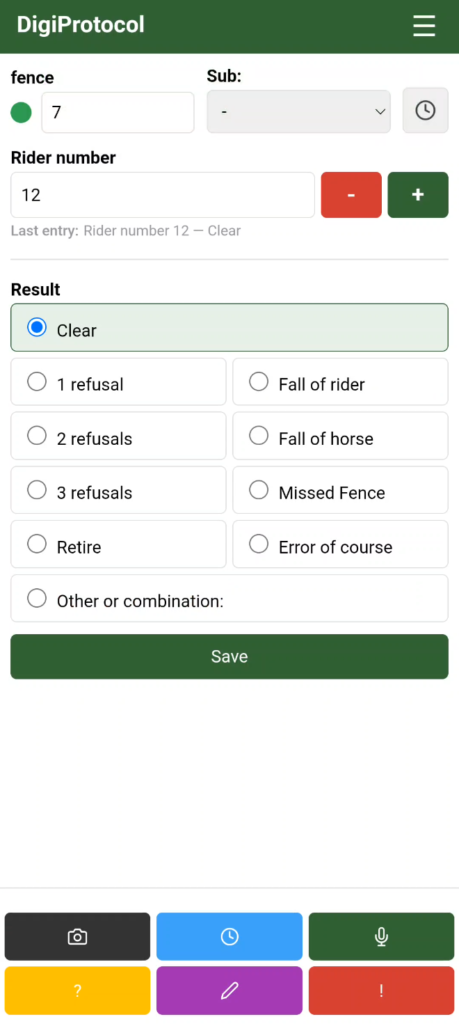
The main fence judge screen
The main screen of the fence judge app is designed for speed and clarity. It allows volunteers to record results within seconds, ensuring they never miss a rider.
Quick Fence Switching: Use the ‘Recent Fences’ button to instantly toggle between multiple obstacles. Ideal for judges overseeing more than one jump.
Adaptive Rider Input: Adjust rider numbers quickly using the large + and – buttons, or tap on the rider number to use the keyboard for direct entry.
Dynamic Result Lists: The layout of results (like Clear, Refusals, or Falls) is fully customizable by the organization. For complex situations, the ‘Other or combination’ button provides access to a comprehensive list of all possible FEI and national scoring scenarios.
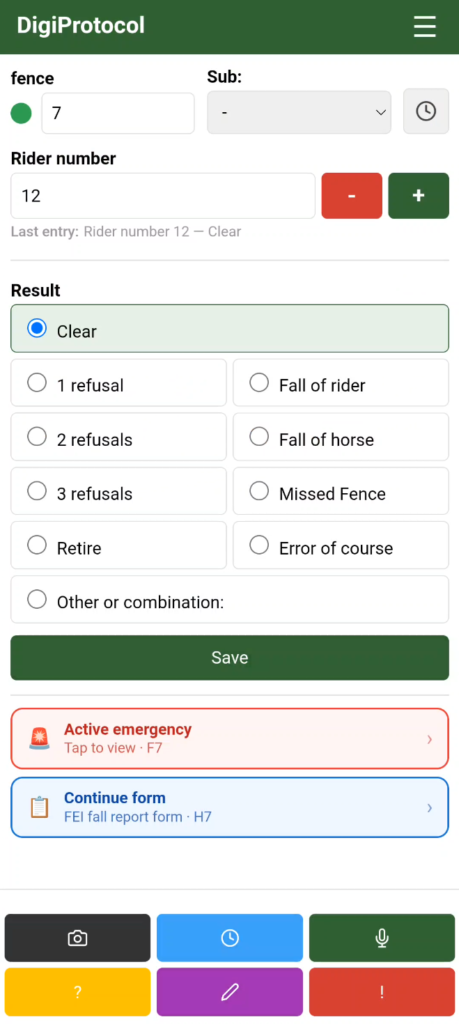
Active Emergency Tracking: When an incident is reported, a prominent alert bar remains visible at the bottom of the screen. This keeps the judge informed of the active emergency status until it is officially resolved by first responders.
Form Progress Recovery: If a judge needs to quickly switch back to the scoring screen while filling out a detailed form (such as an FEI fall report), the app automatically displays a shortcut to easily resume where they left off without losing data.
Instant Action Toolbar: The dedicated buttons at the bottom provide one-tap access to recording video, writing remarks, creating emergency alerts, and more.
Integrated Radio Communication
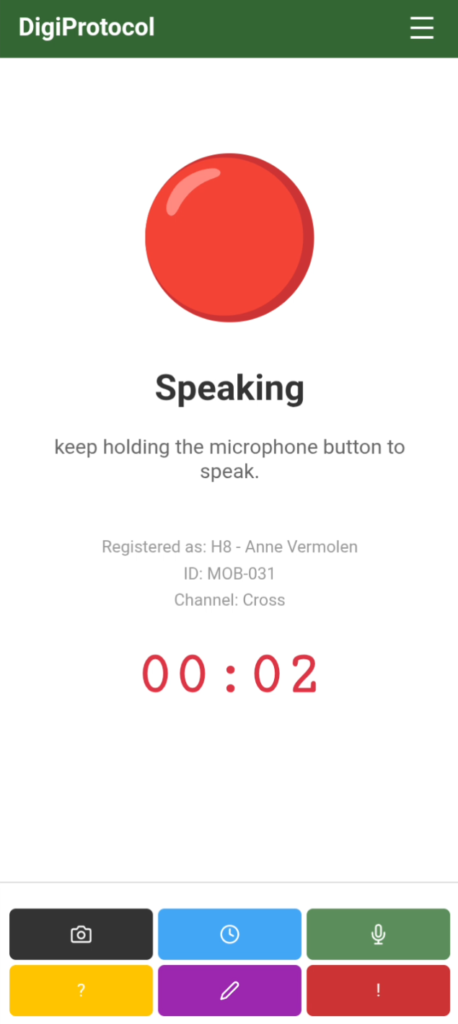
The fence judge app features a built-in radio. This allows judges to communicate directly with the organization by holding the on-screen microphone button or using the physical button on the side of the device. The system uses separate channels for fence judges and emergency personnel to keep communication clear and organized.
Incoming messages are played even when the screen is off, and a smart queuing system ensures messages never overlap. For added security and review, all radio traffic is automatically recorded and can be played back via the management dashboard. Additionally, fence judges can instantly replay the last received message directly from their device.
Note: This feature is available as an add-on. See our pricing page for more information.
Instant Emergency Reporting
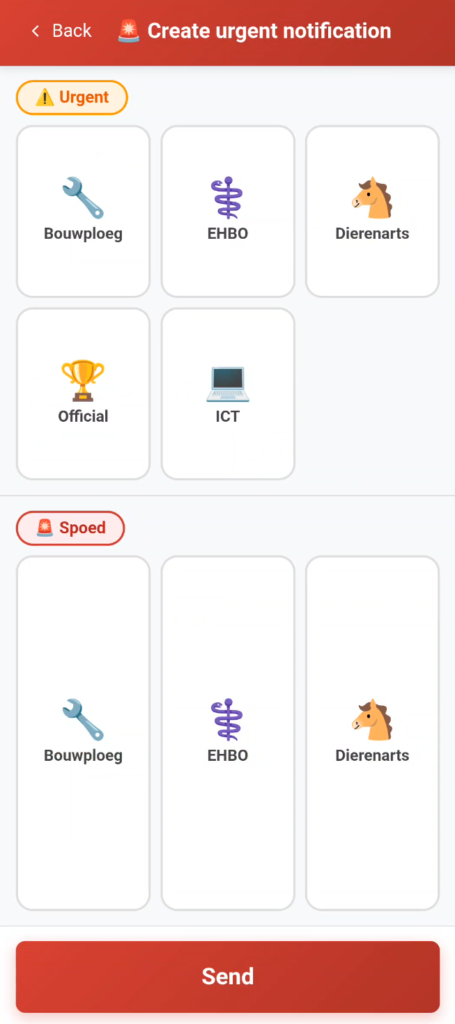
The app includes a specialized interface for creating urgent notifications with a single tap. This feature was specifically designed to eliminate communication errors during high-stress situations. When people panic, radio messages can become unclear or obstacle numbers can be forgotten.
DigiProtocol solves this by automatically attaching the current obstacle number and exact GPS coordinates to every alert. Volunteers simply choose the required service—such as First Aid, Veterinarian, or Construction Crew—using large, color-coded buttons. By sending precise data directly to central command and first responders, we eliminate guesswork and significantly reduce response times when every second counts.
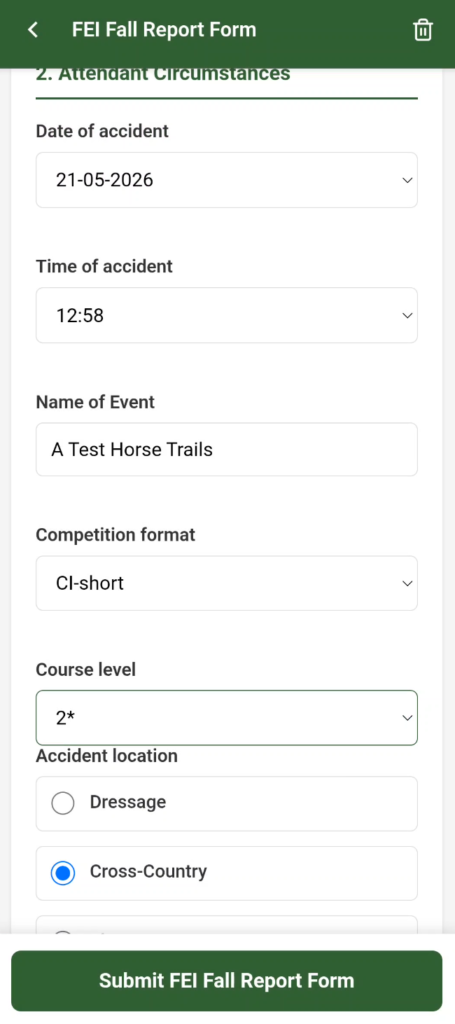
Integrated Digital Forms
The fence judge app features built-in official forms, such as the national KNHS Fall Report and the international FEI Eventing Fall Report Form.
Instead of hassle with wet paper and messy handwriting in the field, judges can easily fill out these digital forms directly within the app. Crucial event details are automatically filled in, and once submitted, the Show Office can instantly view, manage, and print the completed reports directly from the dashboard.
Integrated Camera & Video Evidence
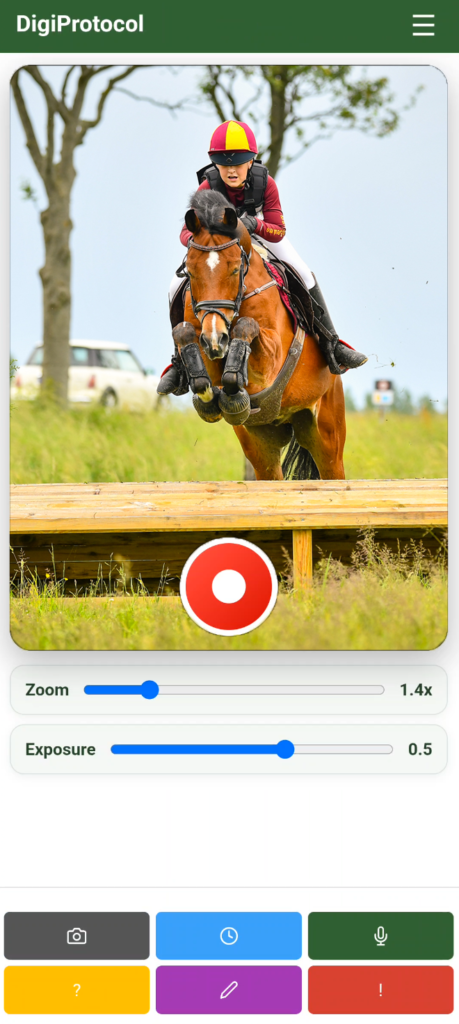
The fence judge app features a built-in camera function, allowing volunteers to record video footage of jumps and riders instantly.
After recording, the app prompts the judge to save the clip and confirm the obstacle and rider numbers. The video is then automatically uploaded in real-time to the Show Office and Coordination Center. This gives organizers instant access to visual evidence on their dashboard to quickly review complex scoring situations or disputed incidents.
Show Office & Coordination Center
Real-Time Results Dashboard
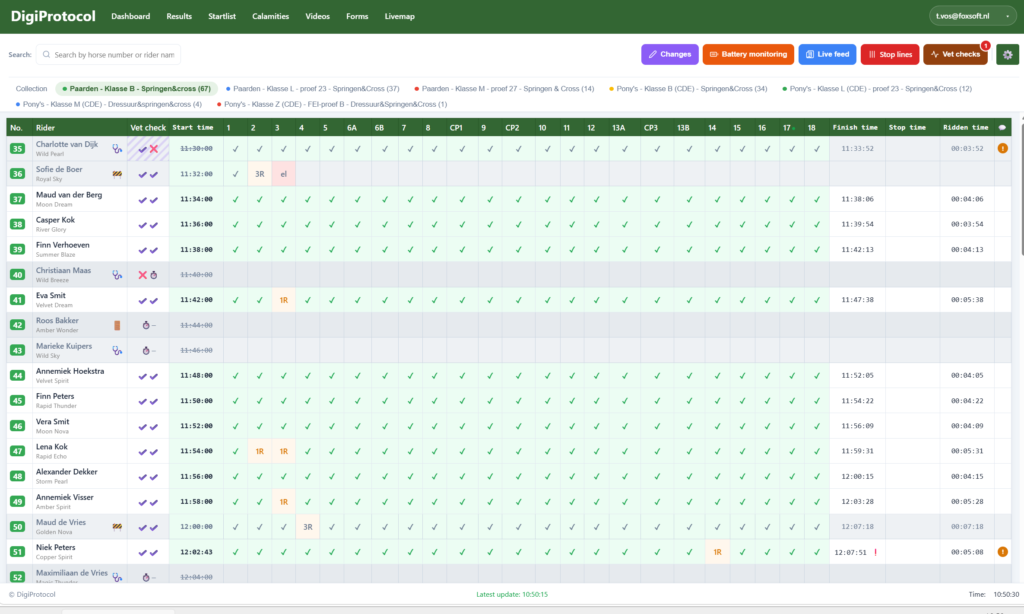
The Results Dashboard is the heart of the DigiProtocol desktop environment. It provides a comprehensive, live overview of all classes, riders, and their performance across the entire course.
-
Instant Scoring Updates: As soon as a fence judge enters a result in the field, it appears on this screen. No more waiting for paper slips; you see every ‘clear’, ‘refusal’, or ‘fall’ as it happens.
-
Live Progress Tracking: Monitor start times, finish times, and calculated ridden times for every competitor. The intuitive grid shows exactly which fences a rider has cleared and where they are on the course.
-
Automated Rider Status: The system automatically identifies riders who are not starting due to medical exclusions or disqualifications from previous phases (Dressage/Jumping). This ensures the Start, Show Office and Coordination Center always have an up-to-date view of who is actually on course.
-
Multi-Class Oversight: Easily switch between different classes or view a collection of all active riders to keep a bird’s-eye view of the competition.
Interactive Live Map
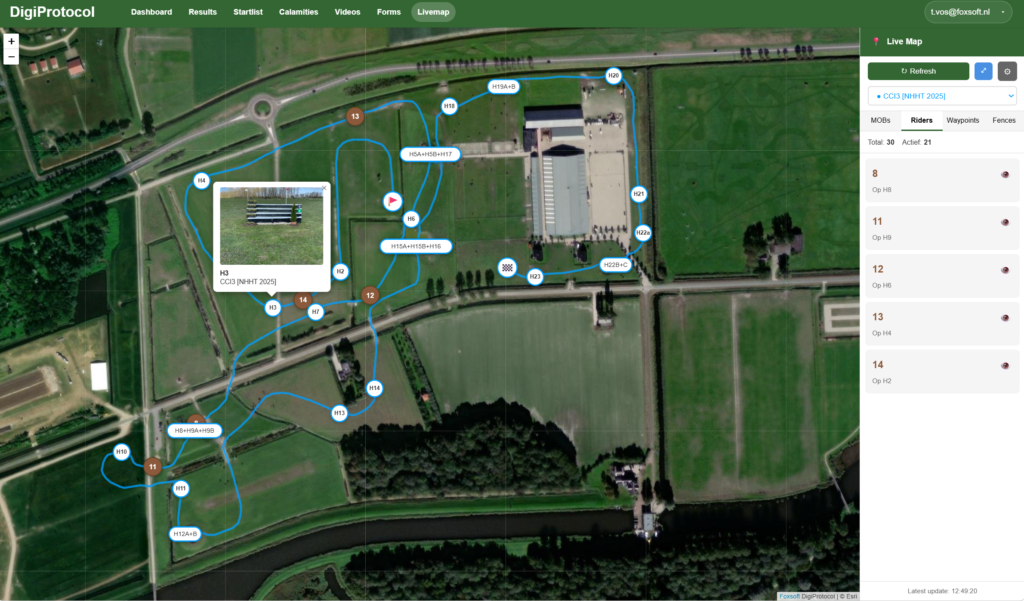
Gain a bird’s-eye view of your entire event with our integrated Live Map. By importing course data directly from CourseWalk, the Coordination Center can visualize the exact route, obstacle locations, and terrain layout in seconds.
Real-Time Tracking: Monitor the live GPS locations of fence judges, medical teams, and officials across the field using DigiProtocol hardware.
Estimated Rider Positions: The system calculates and displays the estimated position of every rider on course based on their most recent fence results.
Enhanced Incident Coordination: In the event of an emergency, the Coordination Center can instantly identify the nearest first responders and guide them to the exact location, significantly improving response times.
Full Situational Awareness: Having a real-time overview of everyone in the field ensures a safer, better-coordinated, and more professional event.
Emergency Response Team (ERT) App
Emergency team in the field
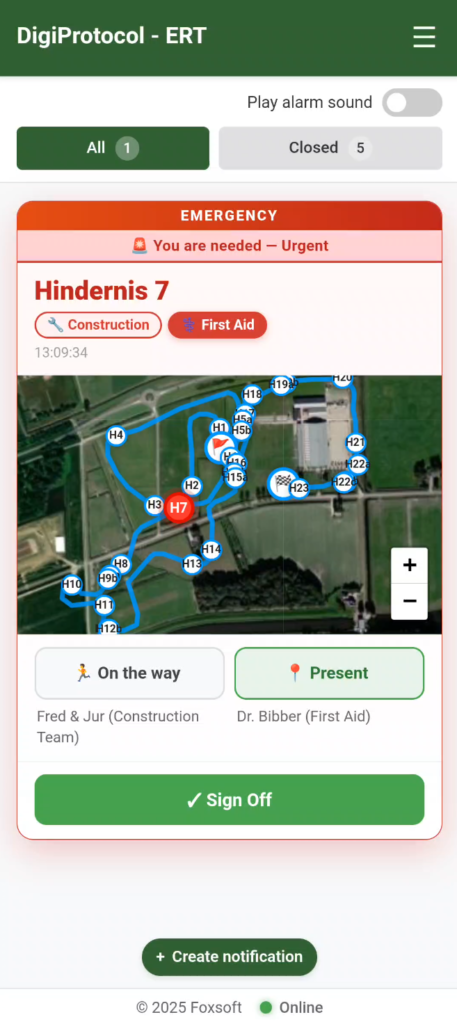
The ERT app is a dedicated mobile interface designed specifically for medical teams, veterinarians, and construction crews, allowing them to respond instantly and effectively when an incident occurs.
Instant Incident Maps: When an emergency alert is triggered, response teams receive a live map showing the exact location of the incident along with their own real-time GPS position, ensuring the fastest route to the scene.
Team Status & Coordination: Responders can tap to update their status to ‘On the way’ or ‘Present’. The entire team and coordination center can see exactly which units are moving and who has already arrived on-site.
Field Notification Alerts: Emergency personnel don’t just receive alerts; they can also create new incident reports directly from their location to request extra assistance or notify the Coordination Center.
Dedicated Emergency Radio: The app includes the built-in radio integration, automatically tuned to a separate, private channel dedicated strictly to emergency response and coordination. (Note: The radio feature is available as an add-on. See our pricing page for more information.)
Start & Finish timing
Start Registration App
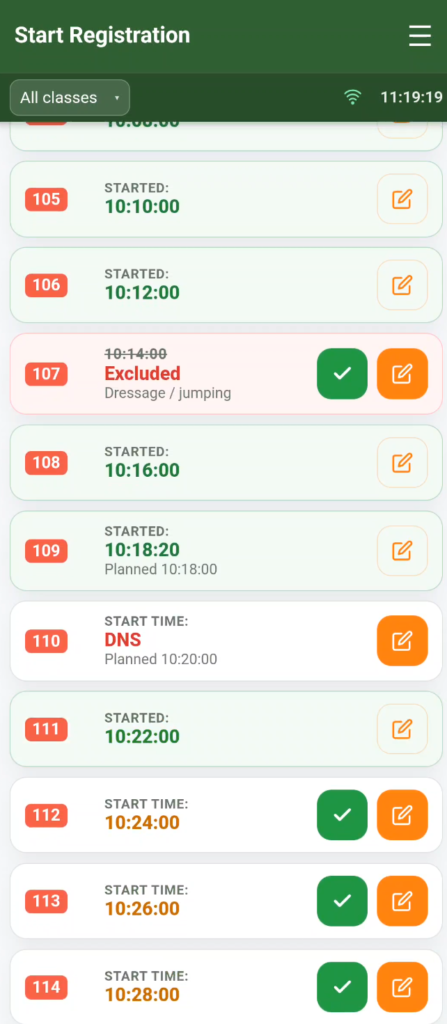
The Start Registration app provides the starting steward with a live, dynamic list to manage starts smoothly and log exact start times without manual paperwork.
Live Start Time Tracking: Record the exact second a rider crosses the start line. The application instantly transmits this data to the Show Office and Coordination Center, automatically updating the master schedule and calculating course progression.
Smart Start-List Syncing: The app automatically flags riders with a ‘Did Not Start’ (DNS) status or those who are ‘Excluded’ from previous phases (such as Dressage or Jumping). This keeps the starter informed in real-time, preventing administrative mistakes at the gate.
Flexible Time Adjustments: Easily adjust or log actual start times when a schedule shifts, ensuring that any delays are instantly calculated across the entire system.
Cross-Class Overview: Quickly switch between different competition classes to manage back-to-back fields efficiently from a single screen.
Finish Registration App
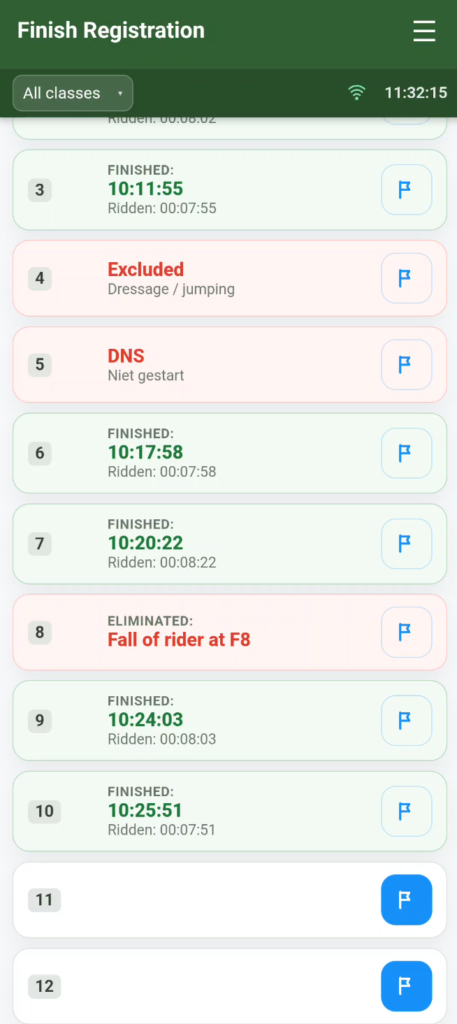
The Finish Registration app gives finish line stewards a live, automated dashboard to log exact completion times, instantly closing the timing loop for every rider.
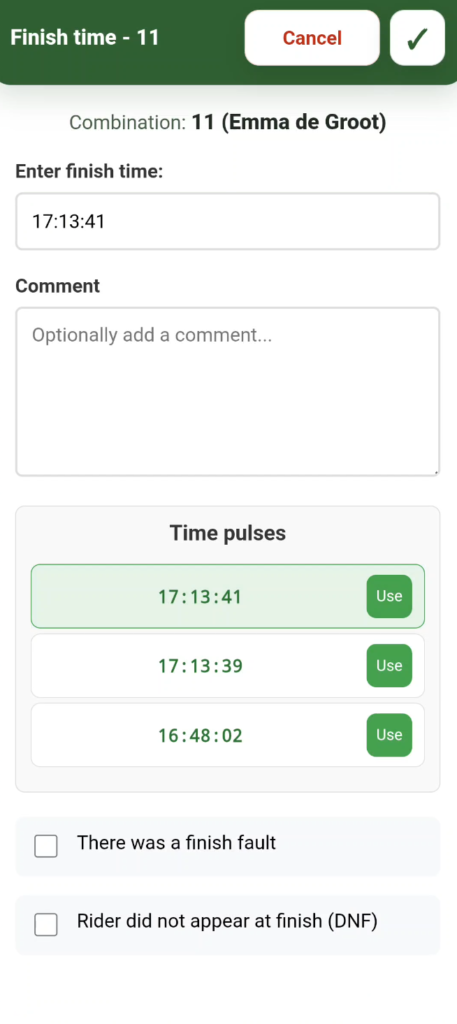
Precise Finish Time Logging: Record the exact time a competitor crosses the finish line. The app automatically calculates the total ridden time against the recorded start time, instantly syncing the results with the Show Office.
Smart Time Pulses: If used with Equipe; the interface captures recent time pulses automatically, allowing the steward to simply tap ‘Use’ to assign the exact recorded time stamp to the correct rider number, eliminating entry errors.
Automated Status Insights: Just like the start, the finish list dynamically displays the real-time status of all competitors. It alerts the steward if a rider has been ‘Excluded’ earlier or ‘Eliminated’ on course (e.g., Fall of rider at F8), so they know exactly who is still on the track.
On-Course Exceptions: Easily log specific finish line incidents, such as tracking finish faults or marking a combination as ‘Did Not Finish’ (DNF) if they fail to appear at the line.
Vet Check app
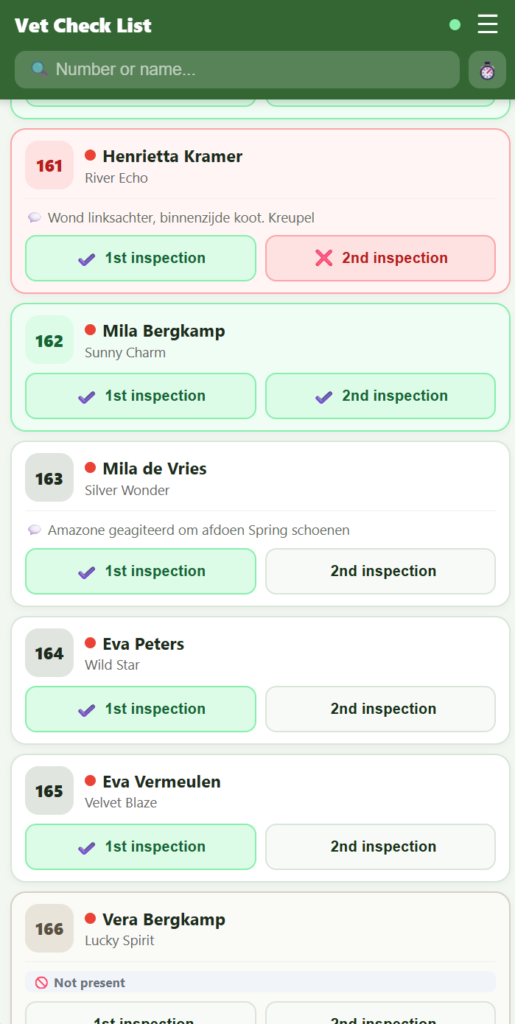
The Vet Check App
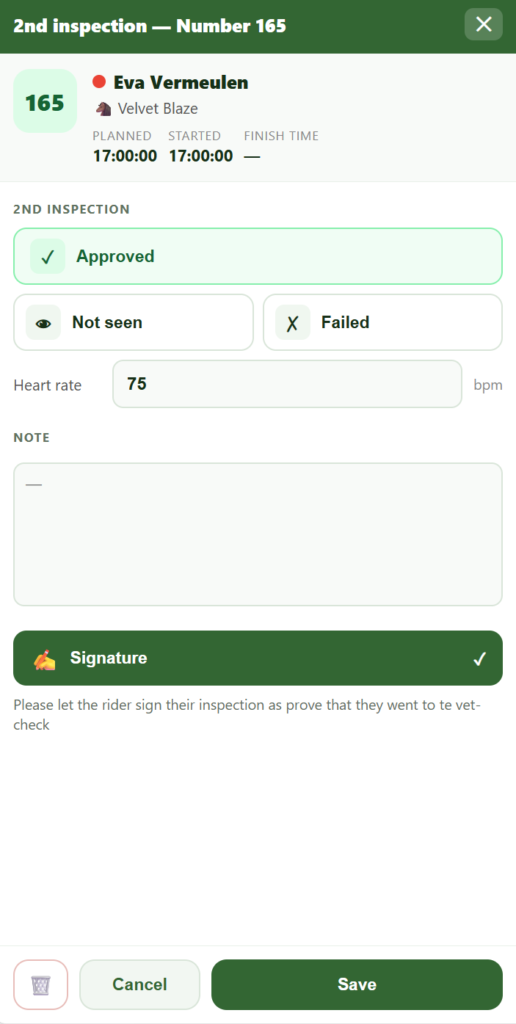
To fully streamline the competition, DigiProtocol extends its ecosystem to the event veterinarians. Equipped with a dedicated mobile interface, vets can log inspection results instantly at the trot-up or vet gate.
- Instant Inspection Sync: Record results for the 1st and 2nd inspections (such as ‘Approved’, ‘Not seen’, or ‘Failed’) with a single tap, alongside vital health parameters like heart rate (bpm) and veterinary remarks.
- Digital Rider Sign-off: Let riders sign directly on the mobile interface immediately after their inspection, providing instant digital proof of attendance at the vet-check.
- Real-Time Show Office Integration: The moment a horse is marked, the result is synchronized with the Show Office. No more delayed paper lists or manual data entry at the secretary’s desk.
- Automated Start List Updates: If a horse fails the inspection, the system instantly flags the rider. The starting gate and stewards immediately know who is cleared to start and who is excluded, preventing administrative errors on course.
- Smart Rider Insights: The interface automatically shows info labels for expected absences—such as riders already excluded from earlier phases or marked as not present—so the veterinary team knows exactly who to expect.
And that’s not all!
Beyond these features, we are continuously developing new functionalities and improvements to make event management even safer and more efficient.
Every event gives us new feedback and ideas, so we can improve our system every event